Detect and inspect
Review topic, occurrence trends, and sample questions. Open linked conversations for root-cause analysis.
Knowledge Gaps
Receiveo monitors every conversation for recurring unanswered themes, groups them into actionable gaps, and gives you fast paths to fix them — all without manually reviewing transcripts.
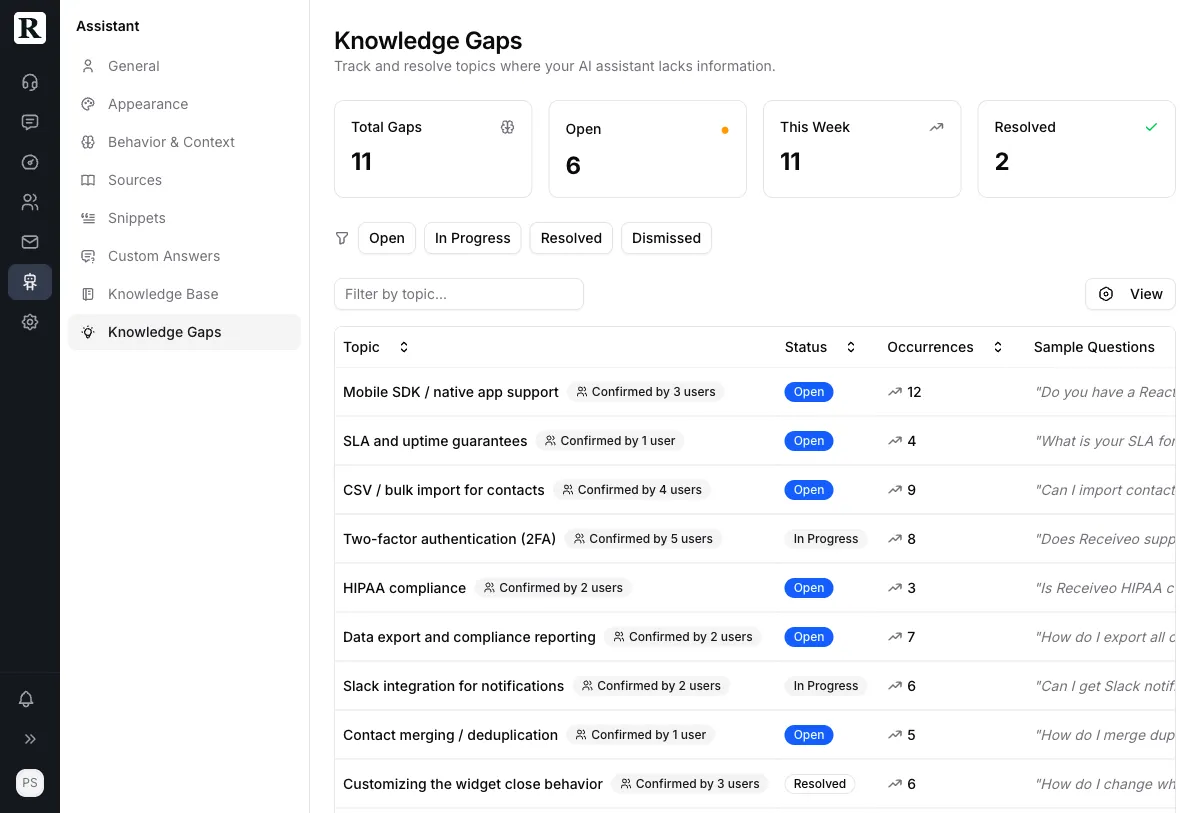
Gap detected
Sample questions
Automatic detection
Receiveo detects gaps from three signals: recurring unanswered themes across conversations, low-quality retrieval events in real time, and thumbs-down feedback from end users. No manual transcript review needed.
Choose a fix
Custom Answer
Exact question-answer pair
Knowledge Snippet
Free-text for RAG retrieval
URL Source
Crawl and index a page
Teach from conversations
Click any AI message in the conversation view to add knowledge. Choose custom answer, snippet, or URL source — the AI learns immediately and the gap is tracked automatically. No context switching.
| Need | Best option |
|---|---|
| Exact policy wording | Custom Answer |
| Short operational guidance | Snippet |
| Long-form explainers | Knowledge Page |
| External docs | Knowledge Source |
Resolution options
Different gaps need different remediation strategies. Use the decision matrix below to choose between custom answers, snippets, knowledge pages, and external sources.
Lifecycle
A repeatable workflow that keeps your knowledge base current and your AI accurate.
Review topic, occurrence trends, and sample questions. Open linked conversations for root-cause analysis.
Mark as in progress. Choose snippet, custom answer, knowledge page, or URL source as the remediation strategy.
Mark resolved when coverage exists. Dismiss only when a topic is intentionally out of scope. Add notes for audits.
Pricing
Unlimited conversations. 10 seats. No credit card needed. Upgrade when you're ready — paid plans from $49/mo. Learn more about the free plan →
For teams who want live chat on their site. Your first shared inbox.
Key features included:
Unlimited live chat
Answer your customers directly, no conversation limits.
For small teams launching AI support across web chat and WhatsApp with a shared inbox and grounded answers.
All the Free features, plus:
AI-Assisted support
AI answers from your knowledge base, grounded in your docs.
For teams running support across web chat and WhatsApp with analytics, AI insight, and knowledge operations.
All the Starter features, plus:
Advanced analytics
Sentiment, resolution tracking, and knowledge gap insights.
For larger teams that need higher volume, broader workspace coverage, and deeper support operations tooling.
All the Growth features, plus:
Priority operations
High-volume support with dedicated onboarding and priority support.
FAQ
Gaps are detected automatically from recurring unresolved themes in conversations and from low-quality retrieval events. They are also created instantly when users give thumbs-down feedback on AI responses. Learn more
Click any AI message in a conversation and add a fix directly — custom answer, snippet, or URL source. The gap is created and resolved in one action. Learn more
Dismiss when a topic is out of scope, duplicate, or intentionally unsupported. Resolve when customers should get a supported answer. Learn more
Yes. Use Conversation Replay to re-run the conversations that exposed the gap through your current AI pipeline and compare the results side by side. Learn more
Knowledge gaps surface automatically. You just fix them.